
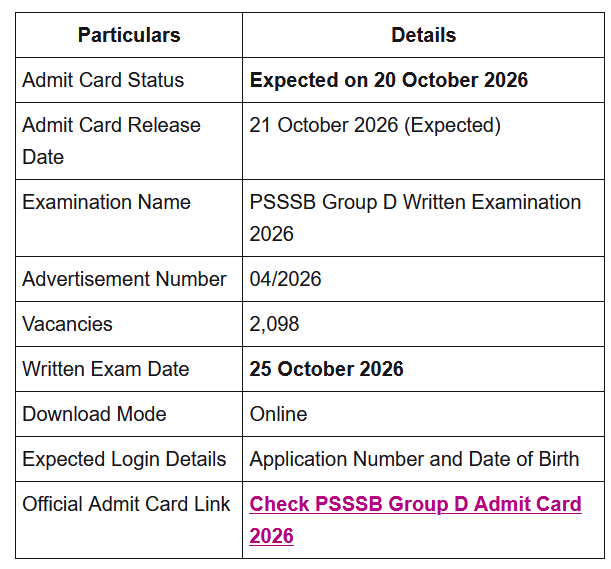
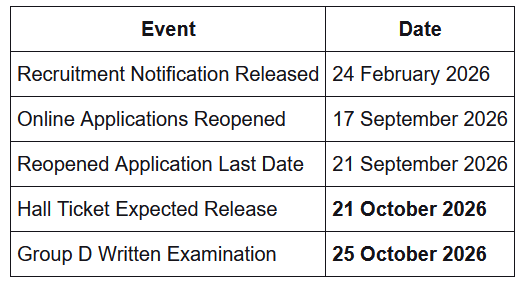
PSSSB Group D Admit Card : PSSSB Group D Admit Card 2026 is expected to be released on 21 October 2026 by the Punjab Subordinate Services Selection Board (PSSSB) for the Group D Recruitment Examination under Advertisement No. 04/2026. The written examination will be conducted on 25 October 2026 (Sunday) for 2,098 vacancies, including Servant, Watchman and other Group D posts.
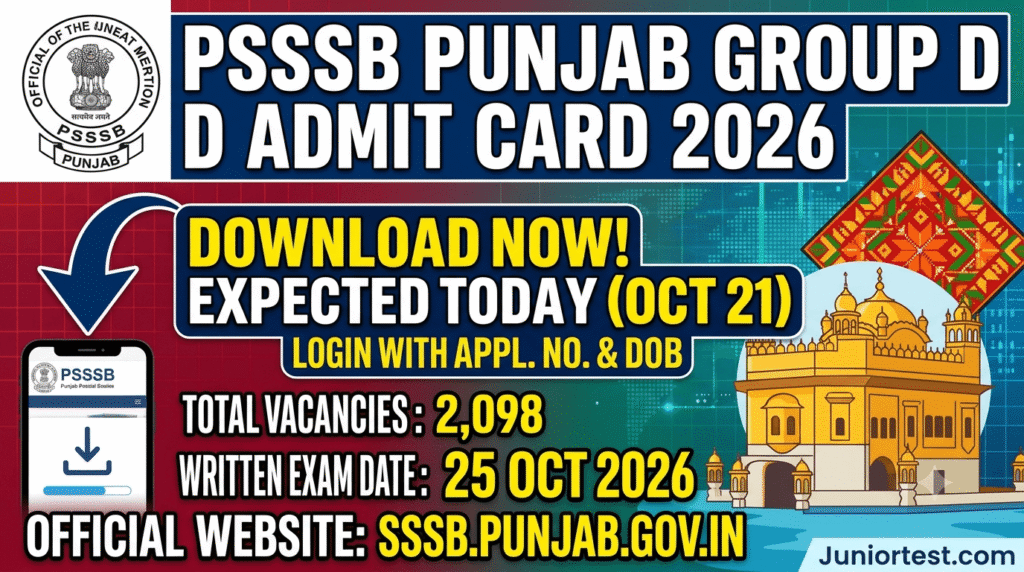
PSSSB Group D Admit Card : Candidates will be able to download their hall tickets through the official PSSSB website using their application number and date of birth once the link is activated. Check the admit card release status, official download link, examination schedule, hall ticket details and important instructions below.
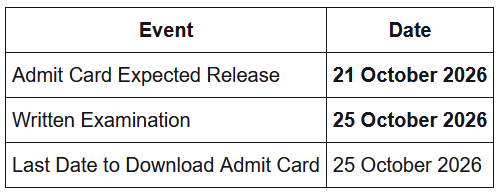
The Punjab Subordinate Services Selection Board is expected to activate the Group D hall ticket download link on 21 October 2026. Candidates should check the official recruitment website for the latest admit card notice.
PSSSB Group D Admit Card 2026 Overview
PSSSB Group D Exam Date 2026
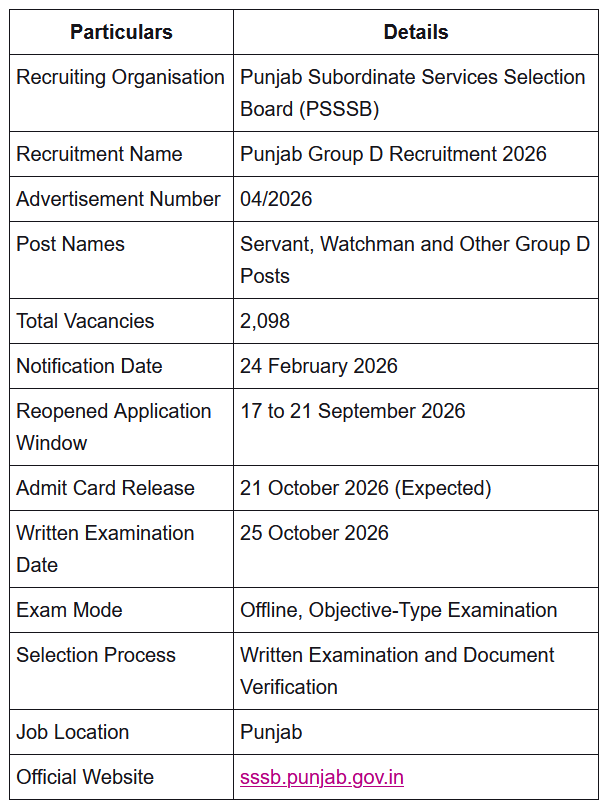
The Punjab Subordinate Services Selection Board has scheduled the Group D written examination for 25 October 2026 (Sunday).
The examination will be held at designated centres. Candidates must check their individual hall tickets for the examination venue, reporting time, entry instructions and any additional requirements.
PSSSB Group D Admit Card 2026 Important Dates
How to Download PSSSB Group D Admit Card 2026?
Candidates can download their Group D hall tickets from the official recruitment website after the link becomes active.
- Visit the official PSSSB website at sssb.punjab.gov.in.
- Open the Latest Announcements or Admit Card section.
- Find the Group D Admit Card 2026 notice under Advertisement No. 04/2026.
- Click the hall ticket download link.
- Enter the application number or other registration details requested by the login page.
- Enter the date of birth or required password.
- Complete any additional verification displayed on the page.
- Submit the details and open the admit card.
- Check the candidate’s name, examination date, venue and reporting time.
- Download the hall ticket and take a clear printout for examination-day use.
Candidates must follow the exact login instructions displayed on the official admit card portal.
Details Mentioned on PSSSB Group D Hall Ticket 2026
The admit card contains important candidate information and examination instructions. Candidates should check the following details carefully:
- Candidate’s name
- Father’s name and mother’s name
- Application number or roll number
- Date of birth
- Category and sub-category
- Photograph and signature
- Examination date
- Examination centre name and address
- Reporting time and examination shift
- Important examination instructions
In case of an error, candidates should contact the recruitment authority through the official channels before the examination.
Documents Required for PSSSB Group D Exam 2026
Candidates should carry the documents specified on their official admit cards.
- Printed copy of the PSSSB Group D Admit Card 2026
- Original valid photo identity proof accepted under the examination instructions
- Any additional document or photograph required by the official admit card
Candidates without the required hall ticket or identification documents may not be permitted to appear in the examination.
PSSSB Group D Exam Pattern 2026
The published examination information describes an offline objective-type written examination. The recruitment coverage provides the following subject distribution for the general written paper:
| Subject | Questions | Marks |
|---|---|---|
| General Knowledge and Current Affairs | 25 | 25 |
| Logical Reasoning and Mental Ability | 25 | 25 |
| Punjabi Language | 13 | 13 |
| English Language | 12 | 12 |
| Punjab History and Culture | 17 | 17 |
| Information and Communication Technology | 8 | 8 |
| Total | 100 | 100 |
PSSSB Group D Written Examination 2026 Instructions
Candidates should carefully read all instructions printed on their admit cards before reporting to the examination centre.
- Download and print the hall ticket before 25 October 2026.
- Verify the examination centre address and reporting time.
- Reach the examination centre well before the prescribed entry deadline.
- Carry the printed admit card and accepted original photo identification.
- Do not carry mobile phones, smartwatches, Bluetooth devices, calculators or other prohibited electronic devices.
- Follow the instructions concerning books, notes, bags and personal belongings.
- Cooperate with examination staff during identity verification.
- Follow the applicable OMR or answer-sheet instructions.
- Do not engage in unfair examination practices.
PSSSB Group D Recruitment 2026 Vacancy Details
The Punjab Subordinate Services Selection Board is conducting the Group D recruitment for 2,098 vacancies.
| Particulars | Details |
|---|---|
| Recruitment | Punjab Group D Recruitment 2026 |
| Advertisement No. | 04/2026 |
| Total Vacancies | 2,098 |
| Posts | Servant, Watchman and Other Group D Positions |
| Pay Scale | Rs. 18,000 to Rs. 56,900 (Level 1) |
PSSSB Group D Selection Process 2026
The recruitment information describes the following selection stages:
- Written Examination
- Document Verification
Also Read: BSF HC RO RM Admit Card 2026
What to Do If PSSSB Group D Admit Card 2026 Is Not Downloading?
Candidates who experience difficulty downloading their hall tickets should check the following:
- Ensure the official admit card download link has been activated.
- Check the application number and date of birth entered on the login page.
- Verify that the selected advertisement is 04/2026.
- Refresh the webpage and try again if the server is temporarily unavailable.
- Access the login through the official PSSSB website.
- Contact the recruitment authority if the issue continues.
PSSSB Group D Admit Card 2026 Important Links
| Description | Official Link |
|---|---|
| PSSSB Group D Admit Card 2026 | Hall Ticket Download Link |
| PSSSB Official Website | Click Here |
| More Updates | Click Here |
Table of Contents